<?xml version="1.0" encoding="utf-8"?><feed xmlns="http://www.w3.org/2005/Atom" ><generator uri="https://jekyllrb.com/" version="3.10.0">Jekyll</generator><link href="http://pragarchitect.github.io/feed.xml" rel="self" type="application/atom+xml" /><link href="http://pragarchitect.github.io/" rel="alternate" type="text/html" /><updated>2025-10-16T11:42:27+00:00</updated><id>http://pragarchitect.github.io/feed.xml</id><title type="html">Pragmatic Architect</title><subtitle>Do what you can, with what you have, where you are.</subtitle><author><name>Marcel Schutte</name></author><entry><title type="html">Architecture as Code</title><link href="http://pragarchitect.github.io/architecture-as-code-java-magazine/" rel="alternate" type="text/html" title="Architecture as Code" /><published>2025-09-18T00:00:00+00:00</published><updated>2025-09-18T00:00:00+00:00</updated><id>http://pragarchitect.github.io/architecture-as-code-java-magazine</id><content type="html" xml:base="http://pragarchitect.github.io/architecture-as-code-java-magazine/"><![CDATA[<p>Imagine a tool running quietly in the background. Nobody’s quite sure what it does, who built it, or why it still exists. It has no clear owner, no trusted documentation. Yet somehow, it serves around 250,000 clients every year. It works, so people leave it alone.</p>

<p>Until one day, it crashes.</p>

<p>Suddenly, this forgotten tool becomes urgent. The operations team scrambles to bring it back, but there’s nothing to go on. No README, no diagrams, no code comments. Just a PDF from 1999 called something like System Overview (Final_v3_new).docx.</p>

<p>We’ve all seen situations like this. Systems that are important, but are barely understood. No one really owns them, and no one keeps track. And when something goes wrong, everyone’s left guessing.</p>

<p>It’s a reminder: when architecture lives only in someone’s head, or in no one’s, it becomes a risk.</p>

<p>The answer isn’t to go back to the old “ivory tower” way of working, where one architect makes all the decisions alone and writes everything down in a big document. That doesn’t help the team, and it doesn’t scale.</p>

<p>Instead, we need a practical approach. One where architecture is part of everyday work. Shared by the team. Visible in the code. Easy to find and easy to update.</p>

<p>This article spotlights three building blocks that support that way of working:</p>

<ol>
  <li>Diagrams that explain the system on different levels</li>
  <li>Documentation that shows why key decisions were made</li>
  <li>Fitness functions that check if the architecture remains compliant with the rules</li>
</ol>

<p>Each of these should be supported by easy-to-use tools. In this article we take a look at the C4 Model for diagrams, ADRs for decision making, and ArchUnit to test architectural rules in code.</p>

<p>This approach makes architecture a team effort. Everyone can understand it. Everyone can help keep it healthy. And we’re less likely to be caught off guard by systems no one remembers.</p>

<h3 id="why-the-c4-model-is-so-powerful">Why the C4 Model Is So Powerful</h3>
<p>The <a href="https://c4model.com/">C4 Model</a>, created by Simon Brown, is a clear and practical way to show software architecture. It works well for a few simple reasons:</p>

<ol>
  <li>
    <p>Different levels for different audiences: C4 has four layers: Context, Container, Component, and Code. You can zoom in or out depending on who you’re talking to. Business stakeholders see how systems connect. Developers see how things work on the inside.</p>
  </li>
  <li>
    <p>One language for the whole team: C4 gives teams a shared way to talk about architecture. It helps in avoiding confusion and makes it easier for technical and non-technical people to understand each other.</p>
  </li>
  <li>
    <p>Focused diagrams: Instead of cramming everything into a single big picture, C4 encourages smaller, more focused diagrams. Each one tells its own part of the story.</p>
  </li>
  <li>
    <p>Diagrams as code: You can write C4 diagrams using a small text-based language. That means you can put them in version control, review them like code, and keep them in sync with the system as it changes.</p>
  </li>
</ol>

<p><strong>Listing 1</strong> shows one way to define the system components using Structurizr DSL.</p>

<div class="language-md highlighter-rouge"><div class="highlight"><pre class="highlight"><code>group "eCommerce Company" {
 
customerPerson = person "Customer"
   	warehousePerson = person "Warehouse Staff"
 
   	ecommerceSystem = softwareSystem "E-Commerce" {
               
		storeContainer = container "Store SPA" "E-Commerce Store"
					stockContainer = container "Stock Management SPA"
				
		apiContainer = container "API" "Backend"  {
						policyComp = component "Authorization Policy"
						controllerComp = component "API Controller"
						database = component "Database""Stores orders, stock"
		}
	}
}
</code></pre></div></div>
<p><em>Listing 1: Declaring components in Structurizr DSL</em></p>

<p>Next, we define how these components relate to each other (see <strong>Listing 2</strong>).</p>

<div class="language-md highlighter-rouge"><div class="highlight"><pre class="highlight"><code><span class="gh"># relationships between people and software systems</span>
customerPerson -&gt; storeContainer "Places Orders" "https"
warehousePerson -&gt; stockContainer "Dispatches Orders" "https"
 
<span class="gh"># relationships to/from containers</span>
stockContainer -&gt; apiContainer "uses" "https"
storeContainer -&gt; apiContainer "uses" "https"
 
<span class="gh"># relationships to/from components</span>
storeContainer -&gt; controllerComp "calls"
stockContainer -&gt; controllerComp "calls"
controllerComp -&gt; policyComp "authenticated and authorized by"
controllerComp -&gt; database "stores and reads data"
</code></pre></div></div>
<p><em>Listing 2: Declaring relationships in Structurizr DSL</em></p>

<p>By adding this, you can generate several different diagrams (see <strong>Listing 3</strong>).</p>

<div class="language-md highlighter-rouge"><div class="highlight"><pre class="highlight"><code>systemContext ecommerceSystem "SystemContext" {
	include <span class="err">*</span>
	autoLayout lr
}
 
container ecommerceSystem "Container" {
	include <span class="err">*</span>
	autoLayout lr
}
 
component apiContainer "Component" {
	include <span class="err">*</span> customerPerson warehousePerson
	autoLayout lr
}
</code></pre></div></div>
<p><em>Listing 3: Declaring different diagrams in Structurizr DSL</em></p>

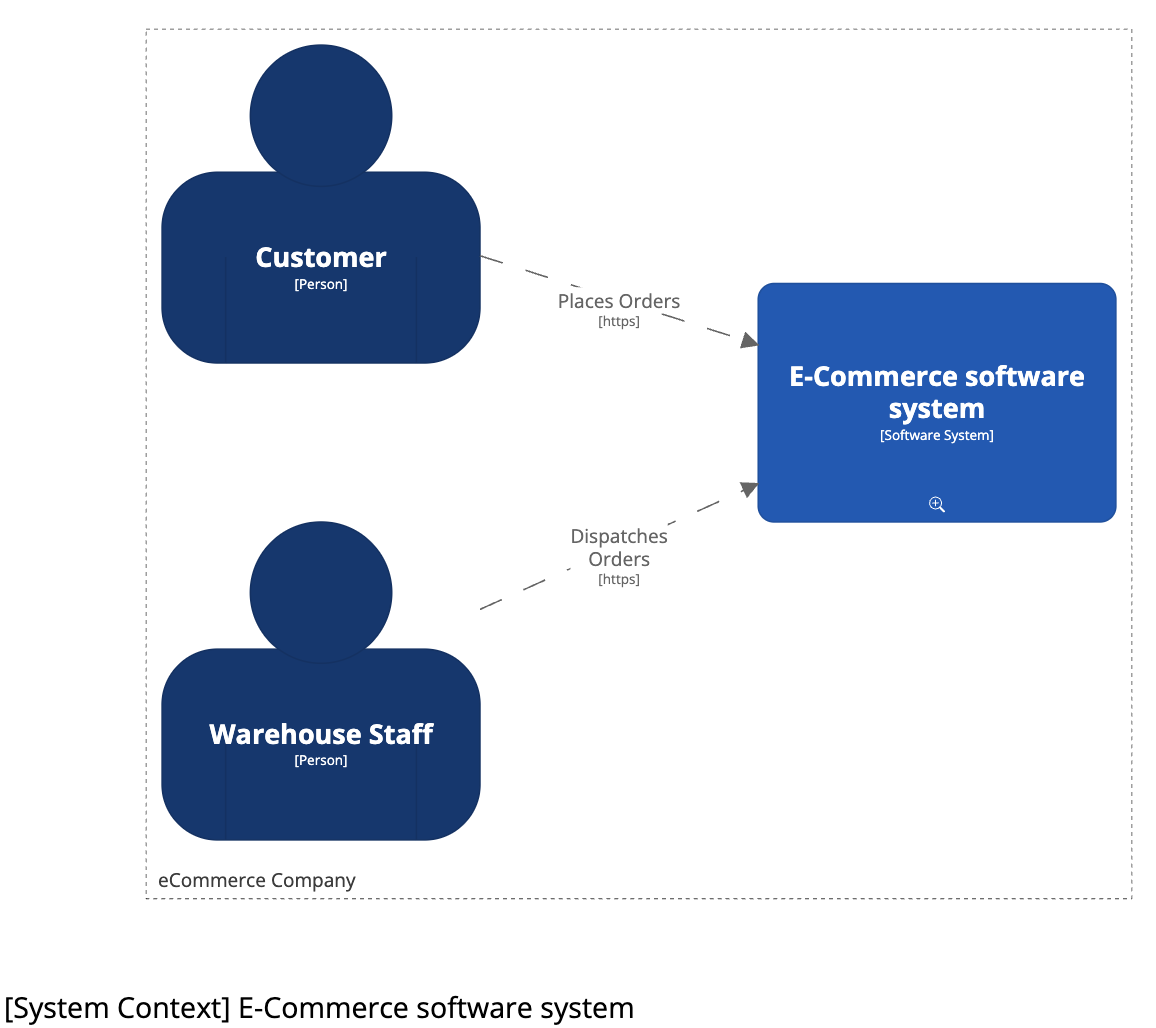
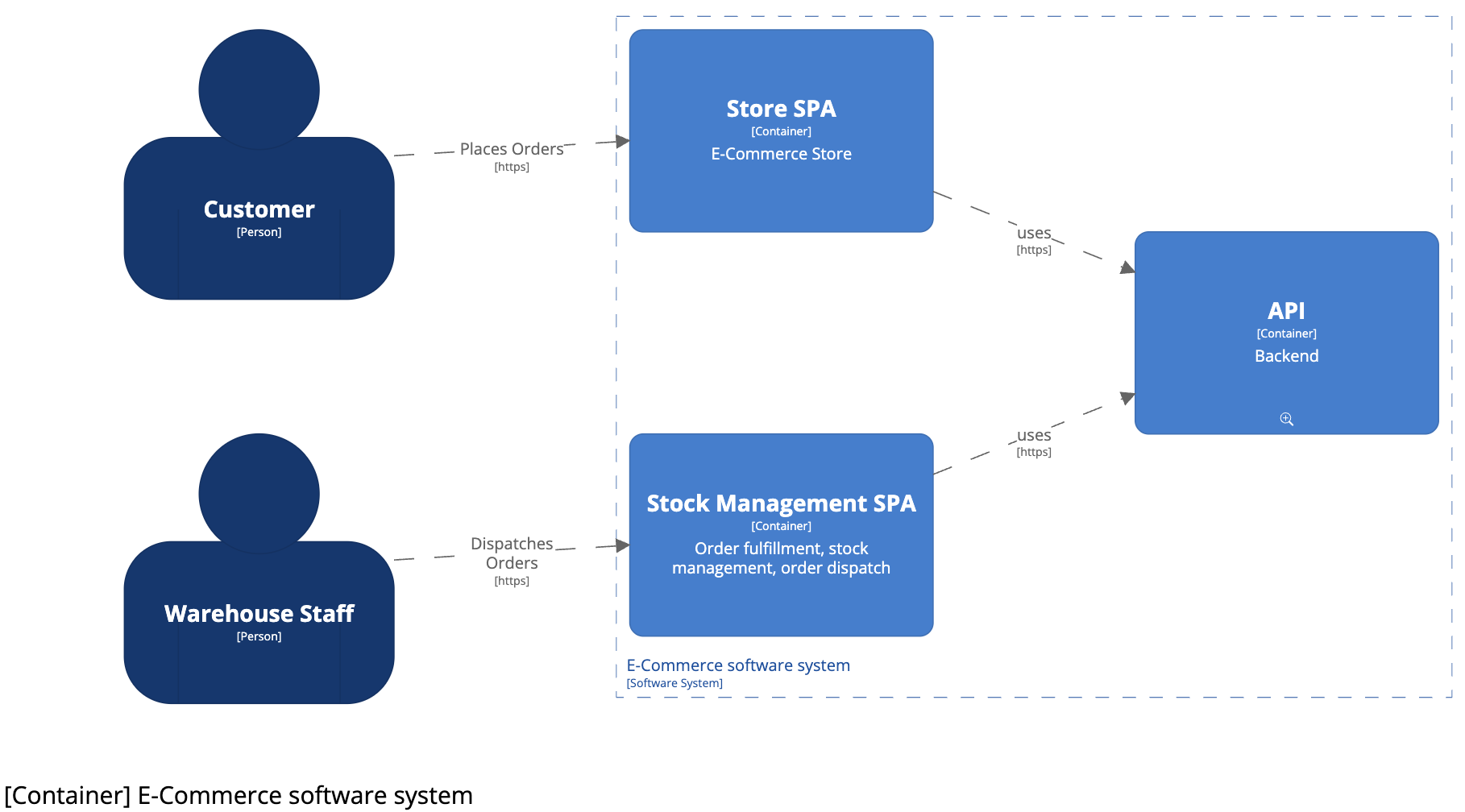
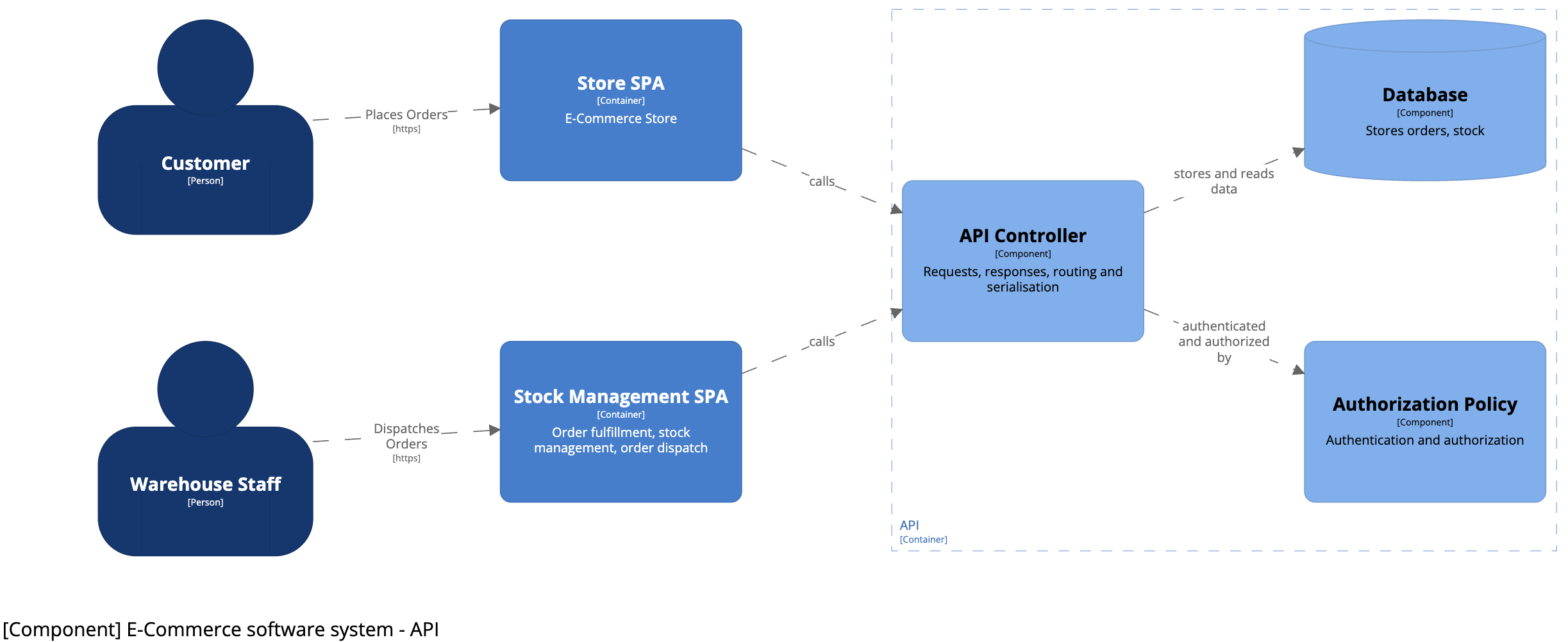
<p>This will create the diagrams depicted in Image 1, 2 and 3.</p>

<p><img src="/images/20250918/fig1-systemcontextdiagram.png" style="width: 700px;" />
<em>Image 1: System context diagram</em></p>

<p><img src="/images/20250918/fig2-containerdiagram.png" style="width: 700px;" />
<em>Image 2: Container diagram</em></p>

<p><img src="/images/20250918/fig3-componentdiagram.png" style="width: 700px;" />
<em>Image 3: Component diagram</em></p>

<h3 id="why-keep-diagrams-in-version-control">Why Keep Diagrams In Version Control?</h3>
<p>By putting our C4 model files in the same Git repository as our code, we get several benefits:</p>

<ol>
  <li>Change tracking: We can see how the architecture changed over time — and why certain choices were made.</li>
  <li>Part of code review: Architecture updates become part of normal reviews. The team can give feedback and spot issues early.</li>
  <li>Stays up to date: Because diagrams live next to the code, they’re easier to update when things change.</li>
  <li>Always available: Everyone with access to the repository has the latest version. No more digging through old folders or outdated Confluence pages.</li>
  <li>Easy to automate: We can generate and publish diagrams automatically when code changes, so the docs stay current with little effort.</li>
</ol>

<p>This makes architecture part of the daily workflow—just like code. It’s no longer a separate task that gets forgotten. It grows with the system and stays useful. That’s what pragmatic architecture looks like.</p>

<h3 id="architecture-decision-records-capturing-the-why">Architecture Decision Records: Capturing the Why</h3>
<p><a href="https://adr.github.io/">ADRs</a> help you document not just what was decided—but why. Code shows what the system does. Application-specific ADRs explain the thinking behind it. That context becomes valuable over time, especially when teams change or systems grow more complex.</p>

<p>Writing ADRs in Markdown keeps things simple. It’s plain text, so it fits easily into Git workflows. You can add or update an ADR in the same pull request as the code change it relates to. That keeps decisions close to the work—and easy to review.</p>

<p>Markdown also lowers the barrier. No extra tools, no special formats. It’s easy to read and write. For developers, it feels familiar—more like writing code than writing documentation.</p>

<p>Keeping ADRs in the codebase gives you version control over decisions. You can see what changed, when, and by whom. You can trace decisions back to specific commits. That way, the documentation stays close to the system—and changes with it.</p>

<p>It’s a small habit that solves a big problem: making sure important architectural choices don’t get lost.</p>

<h3 id="a-practical-example">A Practical Example</h3>
<p><strong>Listing 4</strong> shows what an architectural decision looks like in a Markdown-based ADR.</p>

<div class="language-md highlighter-rouge"><div class="highlight"><pre class="highlight"><code><span class="gh"># {short title, representative of solved problem and found solution}</span>
 
<span class="gu">## Context and Problem Statement</span>
 
<span class="gu">## Considered Options</span>
<span class="p"> 
*</span> {title of option 1}
<span class="p">*</span> {title of option 2}
<span class="p">*</span> {title of option 3}
<span class="p">*</span> … <span class="c">&lt;!-- numbers of options can vary --&gt;</span>
 
<span class="gu">## Decision Outcome</span>
 
Chosen option: "{title of option 1}", because {justification. e.g., only option,
which meets k.o. criterion decision driver | which resolves force {force} | … | comes out best (see below)}.
 
<span class="gu">## Pros and Cons of the Options</span>
 
<span class="gu">### {title of option 1}</span>
 
<span class="gu">## More Information</span>
</code></pre></div></div>
<p><em>Listing 4: ADR template in Markdown</em></p>

<p>This short record captures the full story behind a major change. Keeping ADRs in the codebase lets the documentation grow with the system—and gives future teammates the context they’ll need.</p>

<p>ADRs and project logs like <a href="https://www.projectmanager.com/blog/raid-log-use-one">RAID logs</a> or issue trackers serve different purposes but should be linked. RAID logs can point to ADRs for detailed architectural decisions and rationale. ADRs may include governance on how decisions are enforced and can even document tool selection processes.</p>

<h3 id="archunit-checking-architecture-through-code">ArchUnit: Checking Architecture Through Code</h3>
<p><a href="https://www.archunit.org/">ArchUnit</a> lets you turn architectural rules into code. Instead of relying on diagrams or old docs, you write tests that check if the architecture is still being followed.</p>

<p>These tests run with every build. If something breaks a rule, the build fails—so problems are caught early, before they reach production. Architecture becomes part of the workflow, not just theory.</p>

<p>For example: in a layered setup, UI code shouldn’t talk directly to the database. With ArchUnit, you can write a test that enforces this. It’s clear, repeatable, and doesn’t rely on someone catching it in a review.</p>

<p>By putting rules in code, ArchUnit helps keep your architecture clean—no matter how the system changes over time. It’s not just a diagram anymore. It’s part of the software itself.</p>

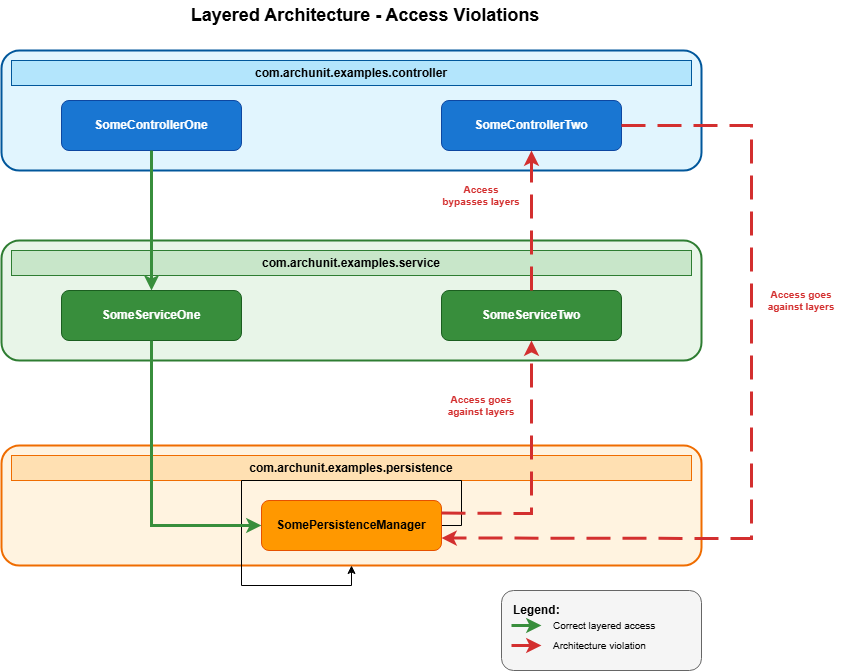
<p>Let’s take a look at a common setup: a layered architecture (<strong>Image 4</strong>).</p>

<p><img src="/images/20250918/fig4-layeredarchitecture.png" style="width: 700px;" />
<em>Image 4: Layered architecture</em></p>

<p>To check that the code follows these rules, you can add this ArchUnit test to your project (<strong>Listing 5</strong>).</p>

<div class="language-java highlighter-rouge"><div class="highlight"><pre class="highlight"><code><span class="nc">JavaClasses</span> <span class="n">jc</span> <span class="o">=</span> <span class="k">new</span> <span class="nc">ClassFileImporter</span><span class="o">().</span><span class="na">importPackages</span><span class="o">(</span><span class="s">"com.archunit.examples"</span><span class="o">);</span>
 
<span class="nc">LayeredArchitecture</span> <span class="n">arch</span> <span class="o">=</span> <span class="n">layeredArchitecture</span><span class="o">()</span>
 
<span class="c1">// Define layers</span>
<span class="o">.</span><span class="na">layer</span><span class="o">(</span><span class="s">"Presentation"</span><span class="o">).</span><span class="na">definedBy</span><span class="o">(</span><span class="s">"..controller.."</span><span class="o">)</span>
<span class="o">.</span><span class="na">layer</span><span class="o">(</span><span class="s">"Service"</span><span class="o">).</span><span class="na">definedBy</span><span class="o">(</span><span class="s">"..service.."</span><span class="o">)</span>
<span class="o">.</span><span class="na">layer</span><span class="o">(</span><span class="s">"Persistence"</span><span class="o">).</span><span class="na">definedBy</span><span class="o">(</span><span class="s">"..persistence.."</span><span class="o">)</span>
 
<span class="c1">// Add constraints</span>
<span class="o">.</span><span class="na">whereLayer</span><span class="o">(</span><span class="s">"Presentation"</span><span class="o">).</span><span class="na">mayNotBeAccessedByAnyLayer</span><span class="o">()</span>
<span class="o">.</span><span class="na">whereLayer</span><span class="o">(</span><span class="s">"Service"</span><span class="o">).</span><span class="na">mayOnlyBeAccessedByLayers</span><span class="o">(</span><span class="s">"Presentation"</span><span class="o">)</span>
<span class="o">.</span><span class="na">whereLayer</span><span class="o">(</span><span class="s">"Persistence"</span><span class="o">).</span><span class="na">mayOnlyBeAccessedByLayers</span><span class="o">(</span><span class="s">"Service"</span><span class="o">);</span>
 
<span class="n">arch</span><span class="o">.</span><span class="na">check</span><span class="o">(</span><span class="n">jc</span><span class="o">);</span>
</code></pre></div></div>
<p><em>Listing 4: ArchUnit test for Layered Architecture</em></p>

<h3 id="more-than-just-layers">More Than Just Layers</h3>
<p>ArchUnit can do much more than check if layers are used correctly. You can test for forbidden dependencies, naming patterns, cycles, inheritance rules, whatever matters for your architecture. It also helps manage technical debt. You can define rules around legacy code or experimental areas to keep them isolated. That makes refactoring safer and more controlled.</p>

<p>ArchUnit works best when combined with other tools: ADRs explain the why, C4 diagrams show the structure, and ArchUnit checks that the code still follows the plan. Together, they form a tight feedback loop.</p>

<p>In CI pipelines, ArchUnit acts as a safety net. Tests run every time. If a rule is broken, the build fails. No guessing. No relying on memory or manual review. It makes architecture visible, testable, and part of the daily routine—even in large or fast-moving teams.</p>

<h3 id="putting-it-all-together">Putting It All Together</h3>
<p>Using C4 diagrams, ADRs, and ArchUnit gives you a grounded, practical way to handle architecture. Each tool covers a different part of the puzzle and together, they help keep design and implementation in sync.</p>

<p>C4 shows how the system fits together, ADRs explain the thinking behind key decisions and ArchUnit makes sure those decisions hold up over time by turning rules into tests. Because all three live in the codebase, they stay close to the work. They evolve as the system does. They stay useful.</p>

<p>Of course, this approach takes a bit of extra effort. Writing down decisions, drawing diagrams, and adding tests might feel like doing more work up front. But your future self, and your teammates, will thank you. The context you capture now will save time later. The diagrams bring clarity. And the ArchUnit tests give confidence when changing code. It’s a small investment that pays off as the system grows.</p>

<p>This way of working makes architecture part of everyday development. It spreads knowledge, builds trust, and avoids surprises—without needing big documents or a single person guarding the plan.</p>

<p>It’s simple, it works, and it keeps architecture real.</p>

<p><em>This article was first published in <a href="https://nljug.org/nieuws/java-magazine-3-is-uit/">Java Magazine 2025-3</a></em></p>]]></content><author><name>Marcel Schutte</name></author><category term="architecture" /><category term="java magazine" /><summary type="html"><![CDATA[Imagine a tool running quietly in the background. Nobody’s quite sure what it does, who built it, or why it still exists. It has no clear owner, no trusted documentation. Yet somehow, it serves around 250,000 clients every year. It works, so people leave it alone. Until one day, it crashes. Suddenly, this forgotten tool becomes urgent. The operations team scrambles to bring it back, but there’s nothing to go on. No README, no diagrams, no code comments. Just a PDF from 1999 called something like System Overview (Final_v3_new).docx. We’ve all seen situations like this. Systems that are important, but are barely understood. No one really owns them, and no one keeps track. And when something goes wrong, everyone’s left guessing. It’s a reminder: when architecture lives only in someone’s head, or in no one’s, it becomes a risk. The answer isn’t to go back to the old “ivory tower” way of working, where one architect makes all the decisions alone and writes everything down in a big document. That doesn’t help the team, and it doesn’t scale. Instead, we need a practical approach. One where architecture is part of everyday work. Shared by the team. Visible in the code. Easy to find and easy to update. This article spotlights three building blocks that support that way of working: Diagrams that explain the system on different levels Documentation that shows why key decisions were made Fitness functions that check if the architecture remains compliant with the rules Each of these should be supported by easy-to-use tools. In this article we take a look at the C4 Model for diagrams, ADRs for decision making, and ArchUnit to test architectural rules in code. This approach makes architecture a team effort. Everyone can understand it. Everyone can help keep it healthy. And we’re less likely to be caught off guard by systems no one remembers.]]></summary></entry><entry><title type="html">Strong Architecture, Stronger Teams - The Power of Shared Responsibility</title><link href="http://pragarchitect.github.io/architecture-is-teamwork/" rel="alternate" type="text/html" title="Strong Architecture, Stronger Teams - The Power of Shared Responsibility" /><published>2025-07-21T00:00:00+00:00</published><updated>2025-07-21T00:00:00+00:00</updated><id>http://pragarchitect.github.io/architecture-is-teamwork</id><content type="html" xml:base="http://pragarchitect.github.io/architecture-is-teamwork/"><![CDATA[<p>Shared responsibility &amp; effort on your software architecture builts great teams &amp; better products.</p>

<p><img src="/images/20250721-teamwork.jpg" style="width: 700px;" /></p>
<p style="text-align:center; font-style: italic;">Photo by <a href="https://unsplash.com/@austindistel?utm_content=creditCopyText&amp;utm_medium=referral&amp;utm_source=unsplash">Austin Distel</a> on <a href="https://unsplash.com/photos/three-men-sitting-while-using-laptops-and-watching-man-beside-whiteboard-wD1LRb9OeEo?utm_content=creditCopyText&amp;utm_medium=referral&amp;utm_source=unsplash">Unsplash</a></p>

<h3 id="building-together-why-architecture-needs-the-whole-team">Building Together: Why Architecture Needs the Whole Team</h3>
<p>Great software is not just about code—it’s about collaboration. A solid architecture provides the foundation, but it’s the team that brings it to life. When architecture is designed without the team’s involvement, it can feel distant and disconnected from their work. But when teams share responsibility, they gain a deeper understanding, make better decisions, and take real ownership of the solution. This leads to stronger teamwork, higher-quality software, and products that truly meet their goals.</p>

<h3 id="the-danger-of-a-distant-architecture">The Danger of a Distant Architecture</h3>
<p>When only the architect makes the decisions, the team may struggle to understand or accept the architecture. Without their involvement, they might see it as something imposed rather than something they own. This can lead to poor implementation, workarounds, or even resistance to change. Important insights from the team may be missed, resulting in a design that looks good on paper but doesn’t fit real-world needs. A strong architecture is not just created—it must be shared, understood, and embraced by the whole team to be truly effective.</p>

<h3 id="value-through-shared-effort-and-responsibility">Value through shared effort and responsibility</h3>
<p>Software teams work better when they feel responsible for the final product. When they are part of the architecture process, they understand the bigger picture and make better decisions. This creates stronger teamwork and improves communication. A sense of ownership also leads to higher-quality software. Instead of just following instructions, teams actively shape the product. Great software comes from shared effort and responsibility.</p>

<p><em>Writer’s note: this article was written as an assignment during a Future Vision Workshop facilitated by Arjan Postma from <a href="https://www.futuresacademy.org/">Futures Academy</a>.</em></p>]]></content><author><name>Marcel Schutte</name></author><category term="architecture" /><summary type="html"><![CDATA[Shared responsibility &amp; effort on your software architecture builts great teams &amp; better products.]]></summary></entry><entry><title type="html">Lessons learned from filling the SoJava conference programme</title><link href="http://pragarchitect.github.io/lessons-learned-SoJava/" rel="alternate" type="text/html" title="Lessons learned from filling the SoJava conference programme" /><published>2025-07-02T00:00:00+00:00</published><updated>2025-07-02T00:00:00+00:00</updated><id>http://pragarchitect.github.io/lessons-learned-SoJava</id><content type="html" xml:base="http://pragarchitect.github.io/lessons-learned-SoJava/"><![CDATA[<p>Last May, I found myself in charge of something I’d never done before: creating the entire programme for a developer conference.
<a href="https://www.sogeti.nl/events/sojava-conferentie-2025/">SoJava 2025</a> was my first shot at conference organizing. The event was set for May 15th at the Forum in Groningen, and while I was part of the broader organizing committee, I had one clear responsibility: build a programme that Java developers would actually want to attend.</p>

<p>No pressure, right?</p>

<p>I knew the basics. Java developers are particular about their content. They want practical insights, real-world examples, and speakers who know what they’re talking about. But knowing what makes a good talk and actually putting together a full afternoon’s worth of them? That’s different.</p>

<p>What followed were months of reaching out to speakers, juggling schedules, second-guessing topic choices, and hoping I was building something worthwhile. Some things went better than expected. Others didn’t go as planned at all.
Here’s what I learned along the way.</p>

<p><img src="/images/20250702-learn.jpg" style="width: 700px;" /></p>
<p style="text-align:center; font-style: italic;">Photo by <a href="https://unsplash.com/@brett_jordan?utm_content=creditCopyText&amp;utm_medium=referral&amp;utm_source=unsplash">Brett Jordan</a> on <a href="https://unsplash.com/photos/brown-wooden-blocks-on-white-table-w7sIj-M5Xyc?utm_content=creditCopyText&amp;utm_medium=referral&amp;utm_source=unsplash">Unsplash</a></p>

<h2 id="lesson-1-start-way-earlier-than-you-think">Lesson 1: Start way earlier than you think</h2>
<p>I thought four months would be plenty of time to find speakers. I was wrong.</p>

<p>My plan seemed solid. As a former Java developer and current architect who speaks at conferences, I had a good network of potential speakers. I figured I could tap into those connections and fill the programme without much trouble.</p>

<p>But reality hit fast. Some speakers were already booked for other conferences. Others liked the idea but couldn’t commit because four months wasn’t enough time for them to develop a solid talk from scratch.</p>

<p>Good speakers don’t just show up and wing it.<span data-pullquote="Good speakers don't just show up and wing it."></span> They need time to come up with a compelling topic, research it properly, build their presentation, and practice it until it flows naturally. The speakers who care about delivering quality content - the ones you actually want - need more runway than I gave them.</p>

<p>The speakers who did commit were absolute legends. Every single one delivered impressive presentations that really connected with the audience. But I had to work much harder than necessary to get there.</p>

<p>If I had started two months earlier, I would have had first pick of available speakers before other conferences locked them in. I also would have given potential speakers enough breathing room to develop something they were genuinely excited about, rather than feeling rushed.</p>

<p>Next time, I’m starting the speaker outreach process at least six months in advance. Maybe longer.</p>

<p><img src="/images/20250702-calendar.jpg" style="width: 700px;" /></p>
<p style="text-align:center; font-style: italic;">Photo by <a href="https://unsplash.com/@towfiqu999999?utm_content=creditCopyText&amp;utm_medium=referral&amp;utm_source=unsplash">Towfiqu barbhuiya</a> on <a href="https://unsplash.com/photos/a-calendar-with-red-push-buttons-pinned-to-it-bwOAixLG0uc?utm_content=creditCopyText&amp;utm_medium=referral&amp;utm_source=unsplash">Unsplash</a></p>

<h2 id="lesson-2-plan-your-conference-structure-first">Lesson 2: Plan your conference structure first</h2>
<p>This year, everything fell into place. But I’ll be honest - that was mostly luck.</p>

<p>I didn’t start with a clear outline of how the day should flow. Instead, I just started booking speakers and hoped it would work out. Somehow, it did. We ended up with a structure that actually made sense:</p>

<ul>
  <li>Opening keynote (fun, not necessarily Java-related)</li>
  <li>Three rounds of breakout sessions (two talks running parallel each round)</li>
  <li>Closing keynote (Java-related and entertaining)</li>
  <li>Drinks and bitterballen</li>
</ul>

<p>The flow worked well.<span data-pullquote="The flow worked well."></span> The opening keynote got people energized without diving straight into technical details. The breakout sessions gave attendees choices and kept the energy up. And the closing keynote sent everyone off on a high note before the networking started.</p>

<p>But I got lucky. What if I had ended up with six highly technical talks and no lighter content? Or three similar talks all scheduled back-to-back? The day could have been a slog.</p>

<p>Next time, I’m creating the conference outline first. I’ll decide on the rhythm and types of sessions before I start reaching out to speakers. That way, I can be more intentional about what I’m looking for instead of just hoping the pieces fit together.</p>

<p><img src="/images/20250702-puzzle.jpg" style="width: 700px;" /></p>
<p style="text-align:center; font-style: italic;">Photo by <a href="https://unsplash.com/@melpoole?utm_content=creditCopyText&amp;utm_medium=referral&amp;utm_source=unsplash">Mel Poole</a> on <a href="https://unsplash.com/photos/black-and-white-heart-shaped-textile-LuaT29bdjMA?utm_content=creditCopyText&amp;utm_medium=referral&amp;utm_source=unsplash">Unsplash</a></p>

<h2 id="lesson-3-dont-do-all-the-outreach-yourself">Lesson 3: Don’t do all the outreach yourself</h2>
<p>Since this was the first time SoJava was open to all developers, we didn’t have an established reputation. Speakers didn’t know about us yet, so I had to actively reach out to everyone.</p>

<p>That meant I was doing all the work. Researching potential speakers, crafting personalized emails, following up, managing responses. It was time-consuming and limited me to only the people I already knew or could find through my network.</p>

<p>The approach worked, but it wasn’t efficient. And I probably missed out on great speakers I simply didn’t think of or couldn’t find.</p>

<p>Next time, I’ll still do active outreach - that personal touch matters, especially for a newer conference. But I’ll also open a Call for Papers. That way, speakers can come to me with ideas I hadn’t considered. It might uncover hidden gems in the community or give newer speakers a chance to participate. <span data-pullquote="It might uncover hidden gems in the community or give newer speakers a chance to participate. "></span></p>

<p>A CFP also takes some pressure off me to think of everything. Instead of trying to imagine every possible topic that would interest Java developers, I can let the community show me what they’re excited about.</p>

<p>It’s about balance. Direct outreach for the speakers you really want, plus a CFP to discover the ones you didn’t know you wanted.</p>

<p><img src="/images/20250702-papers.jpg" style="width: 700px;" /></p>
<p style="text-align:center; font-style: italic;">Photo by <a href="https://unsplash.com/@brett_jordan?utm_content=creditCopyText&amp;utm_medium=referral&amp;utm_source=unsplash">Brett Jordan</a> on <a href="https://unsplash.com/photos/brown-wooden-blocks-on-white-table-w7sIj-M5Xyc?utm_content=creditCopyText&amp;utm_medium=referral&amp;utm_source=unsplash">Unsplash</a></p>

<h2 id="ready-for-round-two">Ready for Round Two</h2>

<p>There were probably dozens of smaller lessons along the way - little things about logistics, communication, and the thousand tiny decisions that go into putting together a conference. But these three were the real nuggets of wisdom that will stick with me.</p>

<p>Start earlier than you think you need to. Plan your conference structure before you start booking speakers. And don’t try to do all the outreach yourself.</p>

<p>I’m already looking forward to SoJava 2026. It’ll be back in May or June of next year, and this time I’ll be ready with everything I learned from round one.</p>

<p>Keep an eye out for our announcements. Maybe I’ll see you in Groningen.</p>]]></content><author><name>Marcel Schutte</name></author><category term="LessonsLearned" /><category term="Conference" /><summary type="html"><![CDATA[Last May, I found myself in charge of something I’d never done before: creating the entire programme for a developer conference. SoJava 2025 was my first shot at conference organizing. The event was set for May 15th at the Forum in Groningen, and while I was part of the broader organizing committee, I had one clear responsibility: build a programme that Java developers would actually want to attend.]]></summary></entry><entry><title type="html">Introducing the Pragmatic Architect</title><link href="http://pragarchitect.github.io/introducing-pragmatic-architect/" rel="alternate" type="text/html" title="Introducing the Pragmatic Architect" /><published>2025-06-13T00:00:00+00:00</published><updated>2025-06-13T00:00:00+00:00</updated><id>http://pragarchitect.github.io/introducing-pragmatic-architect</id><content type="html" xml:base="http://pragarchitect.github.io/introducing-pragmatic-architect/"><![CDATA[<p>Hey there – welcome to Pragmatic Architect, this site is my personal corner of the internet to share thoughts, ideas, and lessons learned about software architecture.</p>

<p>It’s where I’m figuring out what modern, down-to-earth architecture looks like — and how we can make it work in the real world.</p>

<p>You’ll also find my talks, articles, and other stuff I’ve made along the way. Think of it as part blog, part portfolio, part playground.</p>

<p>If you’re into practical, no-nonsense architecture, you’re in the right place. Glad to have you here!</p>]]></content><author><name>Marcel Schutte</name></author><category term="misc" /><summary type="html"><![CDATA[Hey there – welcome to Pragmatic Architect, this site is my personal corner of the internet to share thoughts, ideas, and lessons learned about software architecture.]]></summary></entry></feed>