
Imagine a tool running quietly in the background. Nobody’s quite sure what it does, who built it, or why it still exists. It has no clear owner, no trusted documentation. Yet somehow, it serves around 250,000 clients every year. It works, so people leave it alone.
Until one day, it crashes.
Suddenly, this forgotten tool becomes urgent. The operations team scrambles to bring it back, but there’s nothing to go on. No README, no diagrams, no code comments. Just a PDF from 1999 called something like System Overview (Final_v3_new).docx.
We’ve all seen situations like this. Systems that are important, but are barely understood. No one really owns them, and no one keeps track. And when something goes wrong, everyone’s left guessing.
It’s a reminder: when architecture lives only in someone’s head, or in no one’s, it becomes a risk.
The answer isn’t to go back to the old “ivory tower” way of working, where one architect makes all the decisions alone and writes everything down in a big document. That doesn’t help the team, and it doesn’t scale.
Instead, we need a practical approach. One where architecture is part of everyday work. Shared by the team. Visible in the code. Easy to find and easy to update.
This article spotlights three building blocks that support that way of working:
- Diagrams that explain the system on different levels
- Documentation that shows why key decisions were made
- Fitness functions that check if the architecture remains compliant with the rules
Each of these should be supported by easy-to-use tools. In this article we take a look at the C4 Model for diagrams, ADRs for decision making, and ArchUnit to test architectural rules in code.
This approach makes architecture a team effort. Everyone can understand it. Everyone can help keep it healthy. And we’re less likely to be caught off guard by systems no one remembers.
Why the C4 Model Is So Powerful
The C4 Model, created by Simon Brown, is a clear and practical way to show software architecture. It works well for a few simple reasons:
-
Different levels for different audiences: C4 has four layers: Context, Container, Component, and Code. You can zoom in or out depending on who you’re talking to. Business stakeholders see how systems connect. Developers see how things work on the inside.
-
One language for the whole team: C4 gives teams a shared way to talk about architecture. It helps in avoiding confusion and makes it easier for technical and non-technical people to understand each other.
-
Focused diagrams: Instead of cramming everything into a single big picture, C4 encourages smaller, more focused diagrams. Each one tells its own part of the story.
-
Diagrams as code: You can write C4 diagrams using a small text-based language. That means you can put them in version control, review them like code, and keep them in sync with the system as it changes.
Listing 1 shows one way to define the system components using Structurizr DSL.
group "eCommerce Company" {

customerPerson = person "Customer"
   	warehousePerson = person "Warehouse Staff"

   	ecommerceSystem = softwareSystem "E-Commerce" {

		storeContainer = container "Store SPA" "E-Commerce Store"
					stockContainer = container "Stock Management SPA"

		apiContainer = container "API" "Backend"  {
						policyComp = component "Authorization Policy"
						controllerComp = component "API Controller"
						database = component "Database""Stores orders, stock"
		}
	}
}
Listing 1: Declaring components in Structurizr DSL
Next, we define how these components relate to each other (see Listing 2).
# relationships between people and software systems
customerPerson -> storeContainer "Places Orders" "https"
warehousePerson -> stockContainer "Dispatches Orders" "https"

# relationships to/from containers
stockContainer -> apiContainer "uses" "https"
storeContainer -> apiContainer "uses" "https"

# relationships to/from components
storeContainer -> controllerComp "calls"
stockContainer -> controllerComp "calls"
controllerComp -> policyComp "authenticated and authorized by"
controllerComp -> database "stores and reads data"
Listing 2: Declaring relationships in Structurizr DSL
By adding this, you can generate several different diagrams (see Listing 3).
systemContext ecommerceSystem "SystemContext" {
	include *
	autoLayout lr
}

container ecommerceSystem "Container" {
	include *
	autoLayout lr
}

component apiContainer "Component" {
	include * customerPerson warehousePerson
	autoLayout lr
}
Listing 3: Declaring different diagrams in Structurizr DSL
This will create the diagrams depicted in Image 1, 2 and 3.
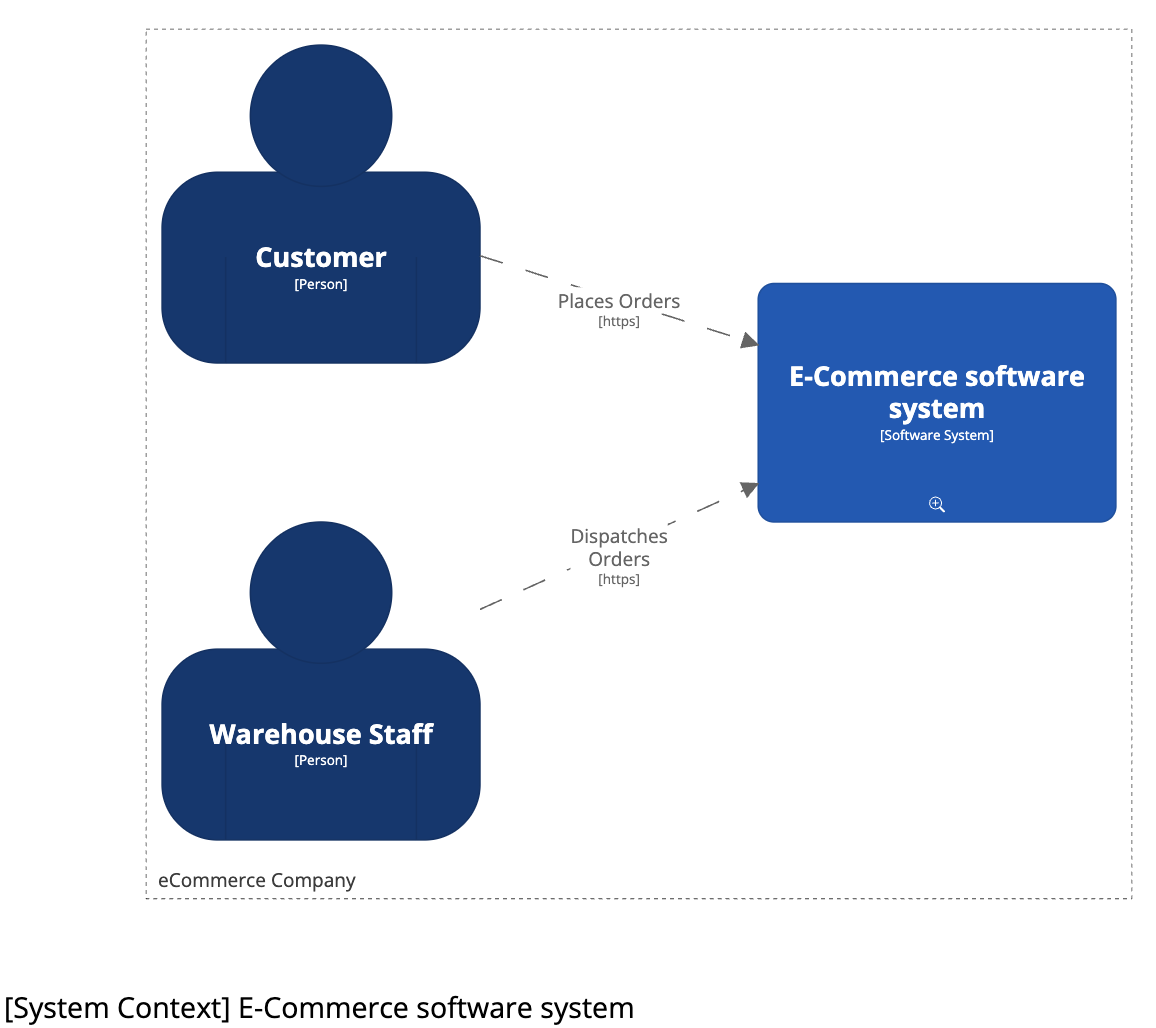 Image 1: System context diagram
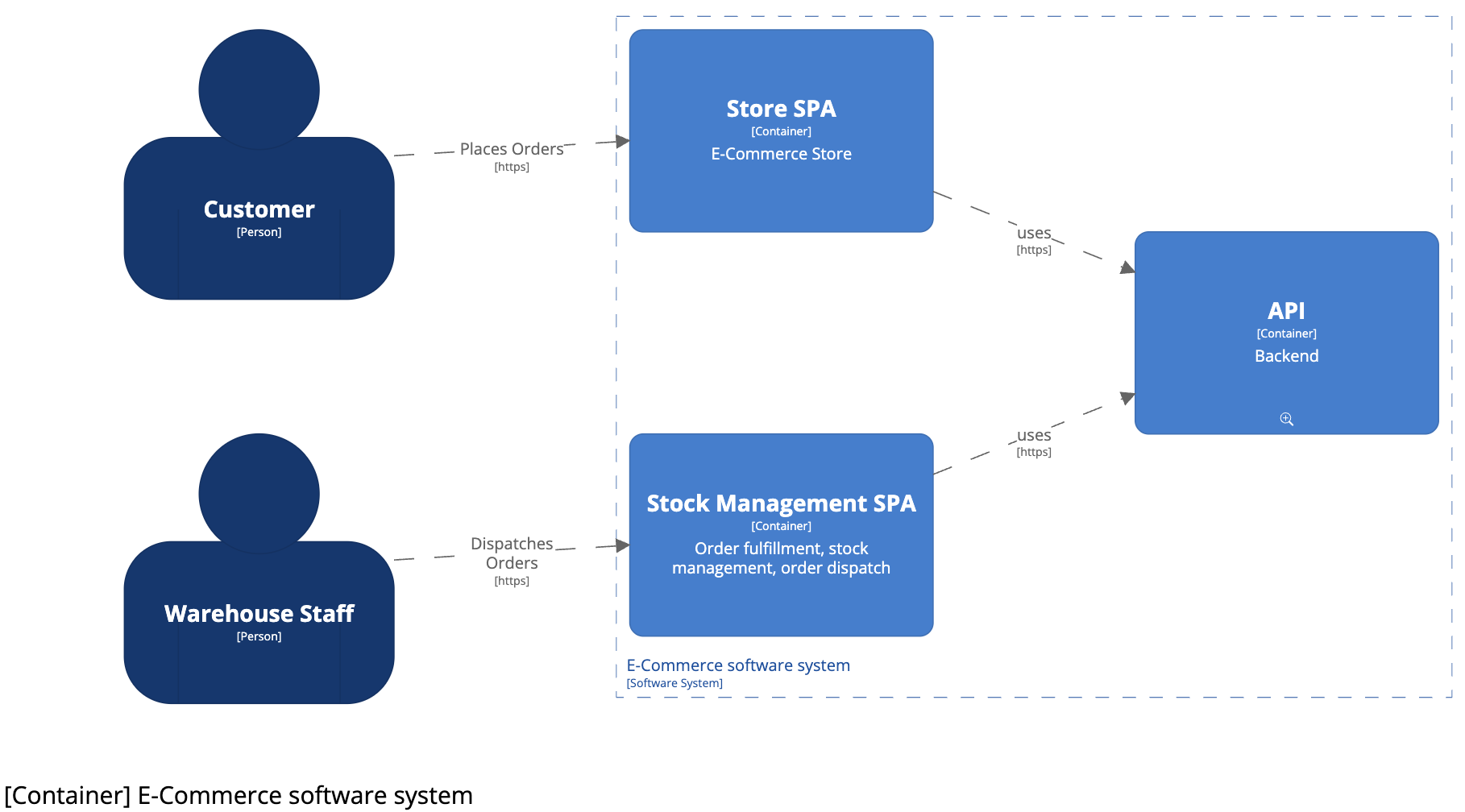 Image 2: Container diagram
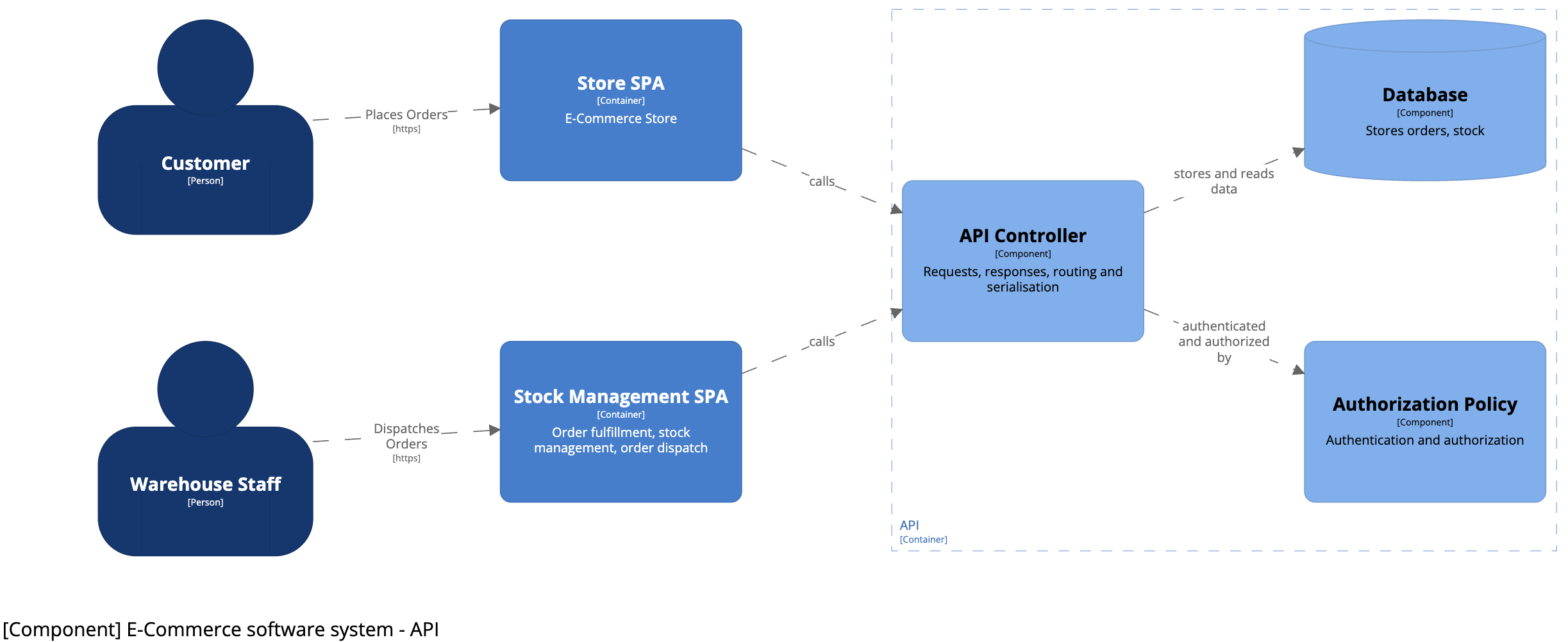 Image 3: Component diagram
Why Keep Diagrams In Version Control?
By putting our C4 model files in the same Git repository as our code, we get several benefits:
- Change tracking: We can see how the architecture changed over time — and why certain choices were made.
- Part of code review: Architecture updates become part of normal reviews. The team can give feedback and spot issues early.
- Stays up to date: Because diagrams live next to the code, they’re easier to update when things change.
- Always available: Everyone with access to the repository has the latest version. No more digging through old folders or outdated Confluence pages.
- Easy to automate: We can generate and publish diagrams automatically when code changes, so the docs stay current with little effort.
This makes architecture part of the daily workflow—just like code. It’s no longer a separate task that gets forgotten. It grows with the system and stays useful. That’s what pragmatic architecture looks like.
Architecture Decision Records: Capturing the Why
ADRs help you document not just what was decided—but why. Code shows what the system does. Application-specific ADRs explain the thinking behind it. That context becomes valuable over time, especially when teams change or systems grow more complex.
Writing ADRs in Markdown keeps things simple. It’s plain text, so it fits easily into Git workflows. You can add or update an ADR in the same pull request as the code change it relates to. That keeps decisions close to the work—and easy to review.
Markdown also lowers the barrier. No extra tools, no special formats. It’s easy to read and write. For developers, it feels familiar—more like writing code than writing documentation.
Keeping ADRs in the codebase gives you version control over decisions. You can see what changed, when, and by whom. You can trace decisions back to specific commits. That way, the documentation stays close to the system—and changes with it.
It’s a small habit that solves a big problem: making sure important architectural choices don’t get lost.
A Practical Example
Listing 4 shows what an architectural decision looks like in a Markdown-based ADR.
# {short title, representative of solved problem and found solution}

## Context and Problem Statement

## Considered Options

* {title of option 1}
* {title of option 2}
* {title of option 3}
* … <!-- numbers of options can vary -->

## Decision Outcome

Chosen option: "{title of option 1}", because {justification. e.g., only option,
which meets k.o. criterion decision driver | which resolves force {force} | … | comes out best (see below)}.

## Pros and Cons of the Options

### {title of option 1}

## More Information
Listing 4: ADR template in Markdown
This short record captures the full story behind a major change. Keeping ADRs in the codebase lets the documentation grow with the system—and gives future teammates the context they’ll need.
ADRs and project logs like RAID logs or issue trackers serve different purposes but should be linked. RAID logs can point to ADRs for detailed architectural decisions and rationale. ADRs may include governance on how decisions are enforced and can even document tool selection processes.
ArchUnit: Checking Architecture Through Code
ArchUnit lets you turn architectural rules into code. Instead of relying on diagrams or old docs, you write tests that check if the architecture is still being followed.
These tests run with every build. If something breaks a rule, the build fails—so problems are caught early, before they reach production. Architecture becomes part of the workflow, not just theory.
For example: in a layered setup, UI code shouldn’t talk directly to the database. With ArchUnit, you can write a test that enforces this. It’s clear, repeatable, and doesn’t rely on someone catching it in a review.
By putting rules in code, ArchUnit helps keep your architecture clean—no matter how the system changes over time. It’s not just a diagram anymore. It’s part of the software itself.
Let’s take a look at a common setup: a layered architecture (Image 4).
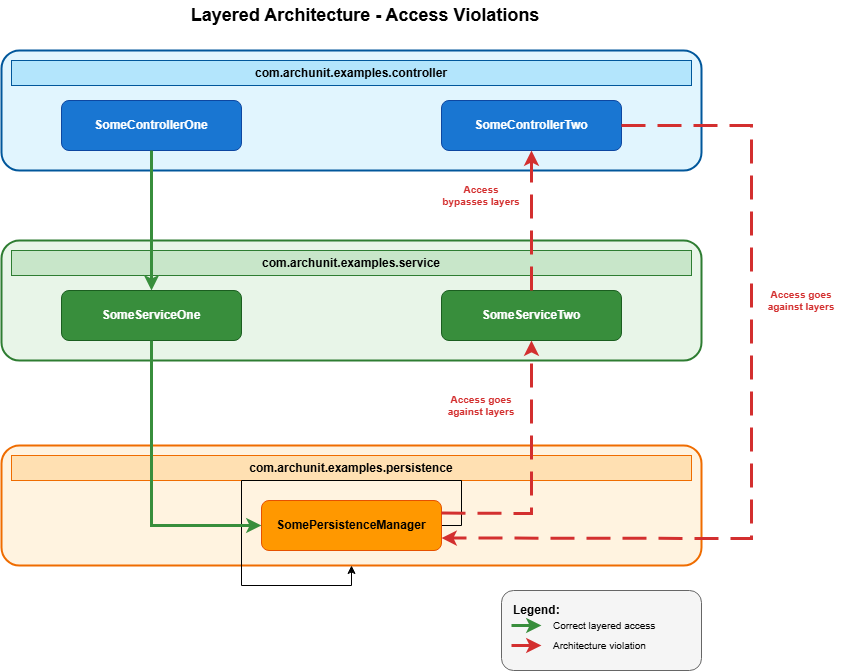 Image 4: Layered architecture
To check that the code follows these rules, you can add this ArchUnit test to your project (Listing 5).
JavaClasses jc = new ClassFileImporter().importPackages("com.archunit.examples");

LayeredArchitecture arch = layeredArchitecture()

// Define layers
.layer("Presentation").definedBy("..controller..")
.layer("Service").definedBy("..service..")
.layer("Persistence").definedBy("..persistence..")

// Add constraints
.whereLayer("Presentation").mayNotBeAccessedByAnyLayer()
.whereLayer("Service").mayOnlyBeAccessedByLayers("Presentation")
.whereLayer("Persistence").mayOnlyBeAccessedByLayers("Service");

arch.check(jc);
Listing 4: ArchUnit test for Layered Architecture
More Than Just Layers
ArchUnit can do much more than check if layers are used correctly. You can test for forbidden dependencies, naming patterns, cycles, inheritance rules, whatever matters for your architecture. It also helps manage technical debt. You can define rules around legacy code or experimental areas to keep them isolated. That makes refactoring safer and more controlled.
ArchUnit works best when combined with other tools: ADRs explain the why, C4 diagrams show the structure, and ArchUnit checks that the code still follows the plan. Together, they form a tight feedback loop.
In CI pipelines, ArchUnit acts as a safety net. Tests run every time. If a rule is broken, the build fails. No guessing. No relying on memory or manual review. It makes architecture visible, testable, and part of the daily routine—even in large or fast-moving teams.
Putting It All Together
Using C4 diagrams, ADRs, and ArchUnit gives you a grounded, practical way to handle architecture. Each tool covers a different part of the puzzle and together, they help keep design and implementation in sync.
C4 shows how the system fits together, ADRs explain the thinking behind key decisions and ArchUnit makes sure those decisions hold up over time by turning rules into tests. Because all three live in the codebase, they stay close to the work. They evolve as the system does. They stay useful.
Of course, this approach takes a bit of extra effort. Writing down decisions, drawing diagrams, and adding tests might feel like doing more work up front. But your future self, and your teammates, will thank you. The context you capture now will save time later. The diagrams bring clarity. And the ArchUnit tests give confidence when changing code. It’s a small investment that pays off as the system grows.
This way of working makes architecture part of everyday development. It spreads knowledge, builds trust, and avoids surprises—without needing big documents or a single person guarding the plan.
It’s simple, it works, and it keeps architecture real.
This article was first published in Java Magazine 2025-3